


In the market for a new CRM? Chances are you’ve already stumbled upon two heavyweights: HubSpot and Pipedrive. Both are undisputed industry leaders, trusted by thousands of companies worldwide as their primary tool for tracking customers and driving sales.
But that doesn’t mean they’re identical, or that they cater to the same types of businesses. Far from it. Each platform was built with a distinct focus and solves entirely different challenges for sales teams.
Here at Forecom, we’ve spent years working directly with both platforms—handling everything from ground-up implementations to complex migrations between CRMs. Because of this hands-on experience, we’ve seen exactly when it makes sense to go all-in on HubSpot, and when Pipedrive is the smarter play.
In this article, we’ll break down the key differences between these two tools and highlight the crucial factors you need to consider before making your final decision.
At a Glance: HubSpot vs. Pipedrive
|
Feature |
HubSpot |
Pipedrive |
|
Core Concept |
All-in-one platform for marketing, sales, and support |
Purpose-built CRM focused strictly on sales pipeline management |
| Primary Focus |
Managing the entire customer lifecycle |
Streamlining the sales process |
|
Sales pipeline |
Just one piece of a broader CRM ecosystem |
The core, most sophisticated feature of the system |
|
Marketing Tools |
Advanced marketing automation, campaigns, and landing pages |
Basic email campaigns; mostly relies on 3rd-party integrations |
|
Automation |
Highly advanced, cross-departmental workflows |
Straightforward automation tailored specifically to sales tasks |
|
Reporting & Analytics |
Comprehensive reporting across marketing, sales, and service |
Focused heavily on sales team performance and forecasting |
|
Ecosystem |
A massive suite of built-in tools within one platform |
A vast marketplace of integrations with external tools |
|
Ease of Use |
Steeper learning curve due to a wide array of features |
Highly intuitive and incredibly easy for reps to adopt |
|
Implementation |
Often requires strategic planning and complex setup |
Fast, plug-and-play setup |
|
Scalability |
Exceptional, built to scale as your company and needs grow |
Can become limiting during rapid growth or complex scaling |
|
Pricing Model |
Low barrier to entry, but costs scale steeply with features |
Predictable, straightforward per-user pricing |
HubSpot CRM
HubSpot is one of the biggest names in the CRM space, widely recognized as a comprehensive platform for managing the entire customer lifecycle. Unlike CRMs built strictly for sales reps, HubSpot brings marketing, sales, and customer service together under one unified roof.
At its core is a central CRM database that tracks contacts, companies, deals, and every single customer touchpoint—from the first form submission to a closed deal or a support ticket. On top of this foundation, you can add specific modules (like Marketing Hub, Sales Hub, or Service Hub) to expand the system's capabilities as your business needs evolve.
This integrated approach is exactly why HubSpot is the go-to choice for companies looking to consolidate most of their customer-facing operations into a single source of truth, rather than juggling a messy tech stack of disjointed tools.
.png?width=1408&height=768&name=Hubspot%20ENG%20(1).png)
Where HubSpot Excels
Its biggest strengths include:
- The all-in-one ecosystem – Marketing, sales, and support teams can operate seamlessly within the same system.
- Powerful marketing engines – Built-in email campaigns, landing pages, forms, and sophisticated lead nurturing.
- Advanced automation – Workflows that trigger based on highly specific user behaviors or data changes in the CRM.
- A massive integration library – Natively connects with tech-stack staples like Gmail, Outlook, Zoom, Shopify, and countless others.
- High scalability – Designed to grow with you. Just add the Hubs and features you need as your operations expand.
- A generous free tier – A great starting point that lets startups and small businesses get up and running with minimal friction.
Where HubSpot Falls Short
With that kind of horsepower comes complexity. When evaluating HubSpot, keep these common hurdles in mind:
- Feature gating – Many of the most powerful, "must-have" features are locked behind the expensive Professional or Enterprise paywalls.
- System complexity – Running multiple Hubs at once can make the interface feel overwhelming, especially for casual users.
- High maintenance demands – Larger setups often require a dedicated CRM Administrator or RevOps specialist to keep the system clean and fully optimized.
Ultimately, HubSpot is a powerhouse for companies ready to heavily invest in aligning their marketing and sales engines long-term. But for teams that just want a clean, straightforward way to manage their pipeline, it can feel like overkill.
Pipedrive CRM
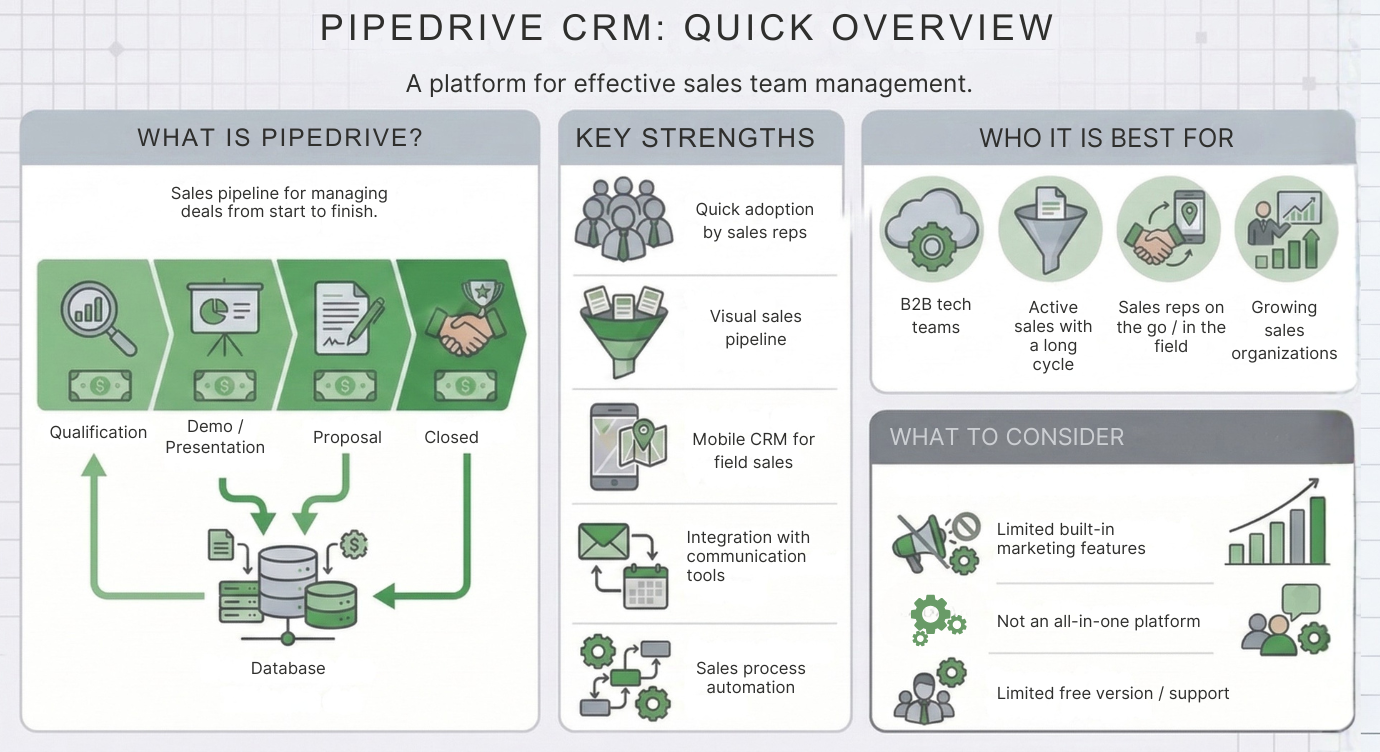
While HubSpot is a comprehensive platform built for the entire customer lifecycle, Pipedrive takes a refreshingly simpler route. From day one, it was designed by salespeople, for salespeople, functioning strictly as a tool to provide clear visibility into deals and effectively manage the sales pipeline.
The beating heart of the system is its visual pipeline. Deals are displayed as cards that you drag and drop through various sales stages. This gives reps an immediate, at-a-glance overview of all deals in progress, letting them focus entirely on the next best action to drive the sale forward.
This sheer simplicity and laser-focus on the sales process are exactly why Pipedrive is a massive hit among small to mid-sized sales teams who just want a CRM to manage their pipelines and power their day-to-day sales execution.
Where Pipedrive Excels
Pipedrive’s greatest asset is its intuitive, clutter-free design. The platform is engineered to minimize admin work so reps can spend their time doing what they do best: selling.
Its main advantages include:
- Crystal-clear visual pipeline – Effortlessly drag and drop deals across your sales stages.
- Rapid user adoption – The learning curve is almost non-existent; reps can master the system in no time.
- Streamlined deal management – A centralized view of all activities, emails, meetings, and tasks tied directly to individual deals.
- Activity-driven approach – The system naturally prompts reps to focus on the next step, keeping the pipeline moving.
- Highly customizable pipelines – Easily create multiple pipelines or tweak stages to match your exact sales motion.
- Solid integration ecosystem – Plays well with your existing email, calendar, automation tools, and marketing platforms.
Because of this, Pipedrive is a highly effective solution for companies looking for a straightforward, sales-first CRM.
Where Pipedrive Falls Short
On the flip side, that strict focus on the sales pipeline can become a bottleneck, especially if your company needs to manage the entire customer journey natively within one system.
The most common limitations we see are:
- Limited marketing capabilities – Advanced marketing automation or complex campaigns usually require connecting third-party tools.
- Basic reporting and analytics – If you need deep revenue operations (RevOps) or cross-channel marketing analysis, you will likely need an external BI tool.
- Rigid data model – The system primarily revolves around basic objects like Deals, Contacts, and Organizations, offering less flexibility for complex data architectures.
- Basic automation capabilities – Workflows tend to be more linear and less sophisticated compared to heavy-duty CRMs.
- Add-on heavy pricing – Some critical advanced features are only unlocked in higher tiers or require paid add-ons.
Pipedrive is a fantastic choice for teams focused purely on efficient pipeline management, but organizations with complex processes or heavy marketing automation needs will eventually outgrow it.
Real-World Scenarios: When to Choose Which?
Every business has unique needs, processes, and growth trajectories. There is no such thing as a "one-size-fits-all" CRM. However, drawing from our experience with CRM implementations and migrations, there are classic scenarios where HubSpot is the obvious winner, and others where Pipedrive takes the crown.
The Ideal HubSpot Customer
Picture a SaaS or tech company with a marketing team actively generating leads across multiple channels—website, content marketing, paid campaigns, or webinars. Dozens or hundreds of new contacts hit the CRM every month. These leads need to be qualified, automatically routed to the right reps, and nurtured through automated email sequences.
The company also needs strict ROI visibility: which marketing efforts are actually driving pipeline and revenue? In this scenario, HubSpot is a no-brainer. It seamlessly bridges the gap between marketing, sales, and reporting, all powered by a single unified database.
The Ideal Pipedrive Customer
Now, imagine a company with a lean sales team whose primary need is clear visibility into deals and rep activities. Lead volume is relatively low, and most new business comes from networking, referrals, or targeted outbound prospecting.
They don’t need complex marketing automation or multi-touch attribution reporting; they just want a fast, clutter-free tool to manage their pipeline. Here, Pipedrive is the perfect fit. It can be deployed rapidly, and the sales team will actually want to use it from day one.
Pricing Breakdown
A CRM’s price tag is rarely just about the base license. For most tools, the true cost depends on user count, required features, and contact database size. HubSpot and Pipedrive take drastically different approaches to pricing, which is a massive factor to weigh in your decision.
HubSpot Pricing
One of HubSpot’s biggest draws is its free CRM, allowing companies to start managing contacts, deals, and basic sales tasks with zero upfront investment. Because of this, it's often the default starter CRM for startups and small businesses.
However, the moment you need advanced features, the price can scale up significantly. HubSpot is modular (e.g., Sales Hub, Marketing Hub, Service Hub), and costs multiply based on user count, your chosen tier, and the size of your marketing contact database.
List prices for Sales Hub, for example, start at:
- Free CRM: $0
- Starter: from $20 per user / month
- Professional: from $100 per user / month (one-time onboarding $1,500)
- Enterprise: from $150 per user / month, annual billing (one-time onboarding $3,500)
For the marketing module, costs are heavily tied to how many contacts you actively market to. Marketing Hub Professional starts from $890 per month, and that price hikes up as your database grows.
According to available information, HubSpot has offered a seats-and-credits model to new customers in EMEA since October 2026; we describe it in our article on HubSpot pricing.
The reality: HubSpot can be incredibly accessible on day one, but once you lean heavily into marketing automation and scale your database, your monthly bill can quickly reach the thousands of dollars.
Pipedrive Pricing
Pipedrive takes a much simpler, highly predictable approach. The pricing model is almost entirely per-user. You pick a tier, and your costs scale linearly with your headcount.
Rough estimates for their plans are as follows:
- Essential: ~$14–$20 per user / month
- Advanced / Growth: ~$24–$40 per user / month
- Professional / Premium: ~$49–$60 per user / month
- Enterprise / Ultimate: ~$79–$100 per user / month
For example, a 10-person sales team on the Professional tier will cost roughly $500–$600 a month, depending on the exact plan and billing cycle.
It is worth noting that Pipedrive monetizes certain features as standalone add-ons (like lead generation tools, chatbots, email marketing, or web visitor tracking). These can bump up your total cost, but the foundational pricing structure remains transparent and easy to forecast.
Conclusion
Both HubSpot and Pipedrive are top-tier CRM systems, but they are built to solve entirely different problems. HubSpot is a powerhouse for companies looking to align marketing, sales, and customer service within a single ecosystem. Pipedrive, on the other hand, shines through its simplicity and razor-sharp focus on sales pipeline management.
That’s why choosing a CRM isn’t just about solving today’s bottlenecks—it’s about anticipating how your sales and marketing operations will scale in the coming years. Your CRM is the backbone of your revenue engine. It needs to support your growth long-term, as ripping and replacing a CRM later down the line is a massive drain on time and technical resources.
Still on the fence about which platform is the right fit for your business? We’d love to help you navigate the decision. You can book a no-obligation, free consultation with our team. We’ll dive into your current processes, business goals, and future roadmaps to recommend the CRM strategy that makes the most sense for your bottom line.
Frequently Asked Questions (FAQ)
1. Is HubSpot better than Pipedrive?
Not necessarily. It entirely depends on your company's specific needs. HubSpot is a comprehensive suite that aligns marketing, sales, and customer service. Pipedrive, conversely, is a streamlined CRM hyper-focused on pipeline management. If your primary goal is clean deal tracking, Pipedrive is likely the better choice. If you want to manage the entire end-to-end customer journey in one place, HubSpot is the clear winner.
2. Who is HubSpot best for?
HubSpot is typically the go-to choice for companies that:
- Actively generate inbound marketing leads (via website, ad campaigns, or content).
- Want tight alignment across their marketing, sales, and customer support teams.
- Require advanced automation and granular, cross-channel reporting.
- Plan to scale rapidly and need a platform that can expand its feature set alongside them.
3. Who is Pipedrive best for?
Pipedrive is usually the ideal fit for businesses that:
- Need a highly visual, easy-to-manage sales pipeline.
- Have small to mid-sized sales teams focused purely on closing deals.
- Don't require complex marketing automation built natively into their CRM.
- Want a lightweight tool with fast implementation and high user adoption.
4. Is HubSpot's CRM actually free?
Yes. HubSpot offers a genuinely free CRM tier that includes core features for managing contacts, deals, tasks, and basic email tracking. However, heavy-hitting features like complex workflows, advanced automation, and custom reporting are locked behind their paid tiers.
5. Is Pipedrive cheaper than HubSpot?
In most cases, yes. Pipedrive features a straightforward, predictable pricing model based primarily on user headcount. While HubSpot has a very low barrier to entry thanks to its free version, costs can skyrocket once you unlock advanced features or scale up your marketing contact database.
6. Can you migrate from Pipedrive to HubSpot?
Absolutely, and it’s a very common move. Companies often graduate from Pipedrive to HubSpot once they outgrow basic pipeline management and need robust marketing automation or a broader CRM ecosystem. A successful migration typically involves securely transferring contacts, deals, and historical activity, as well as redesigning your operational processes for the new platform.


.png?width=458&height=256&name=Untitled%20design%20(36).png)


.png?width=479&height=270&name=Untitled%20design%20(1).png)