


Choosing an enterprise CRM is a decision that impacts your business for years to come. If you are currently looking for a new platform, or your sales reps simply refuse to enter data into your current system, your choice has likely narrowed down to HubSpot and Salesforce.
You can find dozens of articles comparing these systems. However, most of them only theoretically compare pricing and feature lists without considering how companies actually operate in reality.
We base our insights on daily practice. We regularly design architectures, handle integrations, and manage both HubSpot and Salesforce. We have completed numerous complex migrations in both directions. Therefore, we know the real limits of both solutions and understand exactly what running them in the real world entails.
The goal of this article is not to declare a universal winner. We want to show you how to decide based on your processes so that users actually adopt the new CRM and you aren't surprised by hidden costs down the line.
Quick Assessment of Your Starting Situation
During client audits, we always first determine whether the considered system even fits their business model and corporate culture. Below you will find the most common scenarios we encounter and our recommendations for platform selection.
 Do you need to deploy the system quickly and want sales reps to start using it immediately?
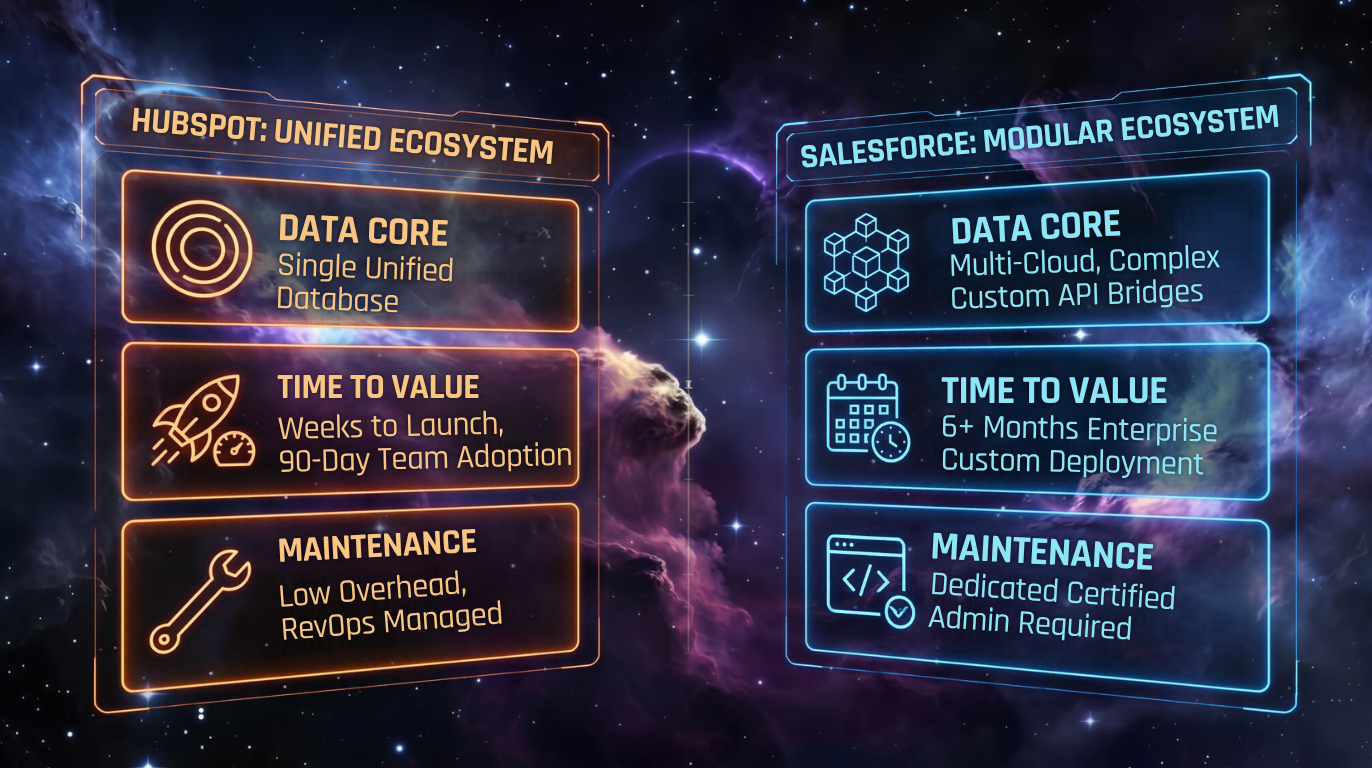
In most standard B2B scenarios, HubSpot is the faster path to deployment and adoption. Sales teams typically show less resistance to it, they adopt new processes more easily, and as a result, you see a real return on your investment much sooner.
Do you manage a complex company with dozens of processes, multiple departments, and strict data access rules?
In this case, Salesforce is the better choice. It functions as a massive building kit that, thanks to its sophisticated infrastructure, can be customized to meet even the most demanding corporate requirements for security and process management.
Do you want marketing, sales, and customer support in one native environment?
HubSpot usually offers an easier path to unifying marketing, sales, and service in one environment. All its parts are built on the same foundation, so data flows seamlessly between teams without the need for complex integrations and maintenance.
Does your business rely on integration with manufacturing, proprietary logistics, or legacy ERP systems?
For extensive data integrations and connections to highly specific internal systems, the Salesforce architecture is better prepared. It can handle massive data flows and connect even with historical applications.
Do you want to manage your CRM without having to pay specialized developers and IT administrators?
Then HubSpot will be the better choice for you. Routine management, environment customization, and setting up smart automations can be handled by a skilled RevOps manager without any coding knowledge.
Do you have complex pricing full of exceptions, dependencies, and discount matrices?
If your sales quotes require highly detailed processes, Salesforce will offer you more flexible and overall more robust tools to set them up exactly tailored to your business.
Do you already have Salesforce in place, clean data, and people who know how to work with it?
If your current system runs reliably from a technical standpoint and you are only struggling with specific sub-processes, it is ultimately often cheaper and less risky to optimize your current environment than to embark on a complete migration elsewhere.
Why Companies Pay for Empty CRMs
A common scenario from our initial audits looks something like this: A company pays for dozens of advanced CRM licenses, but realistically barely utilizes fifteen percent of its potential.
Sales reps only log basic contacts and move opportunities right before closing just to fulfill formal obligations to management. Meanwhile, all the real work and forecasting still run in Excel and emails.
Why does this happen so frequently?
- Overcomplicated processes: Management requires filling out dozens of mandatory fields for perfect reporting, which practically distracts sales reps from actual selling.
- UI Complexity: Working in the system takes longer than working outside of it.
- Lack of maintenance: There is no dedicated internal administrator to continuously clean, simplify, and fix technical bugs in the environment.
HubSpot solves this problem by automatically pulling data from emails and calendars and by maximizing UI simplicity. With robust solutions like Salesforce, on the other hand, the responsibility for user-friendliness lies entirely with your internal team or implementation partner. If you underestimate the user testing phase, the system quickly becomes an unmanageable burden.
What Level of Flexibility Does Your Company Actually Need?
To understand the different behavior of both systems in practice, you just need to look at the core philosophy behind their development.
HubSpot as an Organic Ecosystem
- HubSpot operates on a shared CRM database and a common user interface.
- Adding marketing or customer support doesn't require complex field mapping or synchronization bridges.
- The native connection of hubs is usually simpler and requires less integration work.
Salesforce as a Modular Building Kit
- Salesforce comprises a broad platform ecosystem made up of its own clouds, acquisitions, partner apps, and custom extensions.
- It allows you to build a corporate infrastructure perfectly tailored from the most powerful technologies on the market.
- It requires an experienced architect to ensure that all purchased and integrated parts communicate flawlessly.
Direct Comparison in Core Disciplines
Architectural differences manifest most strongly in the daily work of individual departments. What does real operation look like?
1. Sales and Opportunity Management
- HubSpot's Domain: Quick orientation in open deals, daily calling, and routine task automation. The sales rep has templates, sequences, and meeting scheduling instantly at hand in a single window.
- Salesforce's Domain: Handling extremely complex approval processes across multiple departments and generating complex quotes with highly variable pricing and hundreds of product dependencies.
2. Marketing and Sales Alignment
- HubSpot's Domain: Native data sharing. Marketing sees in real-time which campaigns generate closed won deals, and a sales rep can see with one click what materials a client viewed before a meeting.
- Salesforce's Domain: Large-scale enterprise segmentation and building exceptionally complex customer journeys within Marketing Cloud. However, ensuring a smooth data flow to sales reps often represents a separate, technically demanding project.
3. Customer Support and Service
- HubSpot's Domain: Quick resolution of common queries, shared inbox management, and basic ticketing directly tied to the client in a clean, intuitive package.
- Salesforce's Domain: Managing extensive international call centers, advanced analytics for field technician dispatch, sophisticated SLAs, and guaranteed response times in minutes.
Artificial Intelligence Comparison: HubSpot Breeze vs. Salesforce Agentforce
Innovations in AI are currently the main selling point for both vendors. From an implementer's perspective, however, it is crucial not to evaluate marketing presentations, but the real impact on users' daily efficiency and hidden operational costs. Both systems approach AI differently.
.png?width=1376&height=768&name=Rep%20copilot%20(human%20approves).png) HubSpot Breeze: Assistance for Daily Productivity
HubSpot Breeze: Assistance for Daily Productivity
HubSpot's approach focuses on embedded assistance designed to help sales reps reduce time spent preparing for meetings, navigating communication, and doing routine admin. The tools are directly integrated into the user environment, where they help with immediate operations.
- Automatic summarization of long email threads before a meeting.
- Generating response drafts based on the context of previous communication.
- Enriching missing contact data from public sources.
- A portion of the AI features is available within selected HubSpot tiers, while more advanced functions and agents may utilize HubSpot Credits.
Salesforce Agentforce: Autonomous Enterprise Process Management
Salesforce aims at the complex deployment of autonomous agents capable of independently resolving entire workflows without human intervention. This is an exceptionally powerful tool for large contact centers or global organizations.
- Independent evaluation and qualification of thousands of leads across regions.
- Autonomous resolution of complex service cases requiring data verification in external systems.
- Strict demands on data hygiene – AI in Salesforce requires absolutely precisely structured data.
- Costs grow with actual usage; the system is often billed through flex credits, fixed fees per resolved request, or special enterprise licenses.
Total Cost of Ownership Across Four Levels
Comparing only the list prices for user licenses leads to a gross distortion of the actual costs. During our projects, we always calculate TCO across four separate levels.
1. Licensing Fees
The basic metric covering the number of users and the chosen tier. While HubSpot typically has a steeper transition between Professional and Enterprise tiers, Salesforce's structure is more fragmented and requires careful mapping of exactly which add-ons individual users will actually need.
2. Implementation and Integration Costs
This is where the biggest differences emerge. HubSpot's data model allows, in common B2B scenarios, for implementation and data migration to typically be completed in a matter of months. Salesforce requires a longer preparation phase for architecture design, custom development, and data mapping, which significantly increases the initial deployment investment.
3. Operations, Management, and Development
Companies often overlook this point when selecting a CRM. Routine management and development of HubSpot are usually handled by a trained internal RevOps manager as part of their standard agenda. Operating Salesforce overwhelmingly requires allocating a dedicated, certified full-time administrator, or an external developer, representing significant fixed payroll costs annually.
4. Costs Associated with Low User Adoption
The biggest hidden cost is a system full of outdated data. If a complex UI forces sales reps to work outside the CRM, the company loses accurate forecasting, loses continuity when key employees leave, and managers spend hours a week manually checking reports.
When Salesforce Often Remains the Strongest Candidate
As a HubSpot partner, we could claim that it is a universal solution for every situation. Practice, however, shows the exact opposite. There are clearly defined business models where we directly recommend clients choose, or keep, Salesforce.
If your business model requires an extremely detailed permissions hierarchy (field-level security for hundreds of different roles), extensive data integration into proprietary logistics systems, and you work with highly customized objects that deviate entirely from standard B2B sales, HubSpot will hit its architectural limits.
In these cases, Salesforce provides a robust development environment and absolute control over every data point.
Critical Questions Before the Final Decision
Before you sign a contract for a new solution or begin a costly migration of your current system, we recommend finding objective answers to the following five questions at the management level.
- What capacity of our internal IT team can we dedicate long-term to managing and developing our CRM?
- Can we clearly define and describe our sales process, or are we hoping the new software will create it for us?
- Is rapid deployment and immediate user adoption critical for us, or are we building a complex infrastructure for the next ten years?
- How much work are our sales reps currently doing outside the existing system, and why?
- Does our pricing and quoting require linking dozens of variables, price lists, and product dependencies?
The right choice of a CRM does not depend on the number of features in a vendor's promotional material, but on the system's ability to adapt to the real life of your company. If you are currently figuring out which platform will better support your growth goals and ensure seamless team adoption, it makes sense to look at your processes in more detail.
Conclusion
Selecting a CRM never ends with comparing price lists and ticking off required features. The true measure of a successful implementation is your users' willingness to work with the system daily and your company's ability to keep it running long-term without unexpected costs. Even the most perfect data architecture loses its meaning the moment sales reps bypass it and key information remains outside the CRM.
Our practice clearly shows that there is no single universally better software. There is only a system that naturally fits your current growth stage, technical background, and the complexity of your business processes.
If you are currently facing the selection of a new solution, considering a migration, or just trying to save a system your team refuses to populate with data, we will gladly provide our independent implementer's perspective.
During an initial consultation, we will map your key processes, assess the state of your data, and help you define the realistic total costs of a potential implementation.
Book a free, no-obligation consultation with us, and together we will design an architecture that genuinely moves your sales and marketing team forward.


.png)

.png)