


Most companies today use artificial intelligence as an external tool. They copy an email or client data from their CRM, paste it into ChatGPT, have it generate a response, and then copy that response back. This process works, but it’s clunky, unnecessarily time-consuming, and increases the risk of errors when transferring information. With the launch of Breeze AI, HubSpot has decided to eliminate this intermediate step and has deployed artificial intelligence directly where the company’s data actually resides.
Breeze is a suite of AI features and agents integrated directly into HubSpot. Its main advantage is the ability to work with context stored in the CRM and other connected sources. Depending on account settings and permissions, selected features can analyze CRM records, communications, notes, or call transcripts.
Integrated context can significantly reduce the problem of generic and impractical outputs that common generative models struggle with. However, it does not eliminate the risk of misinterpretation or the need for human oversight. In this article, we’ll break down the individual components of Breeze AI, present a real-world case study of its implementation at one of our clients, explain how credits work, and examine how to accurately measure the return on this investment.
The Main Pillars of Breeze AI
Breeze is not a single, isolated tool but consists of three interconnected components. It is important to distinguish between an assistant, which responds to your direct instructions; an agent, which independently executes a defined process; and data functions.
Breeze Assistant: A Helper for Day-to-Day Work
Breeze Assistant (formerly and often still referred to as Breeze Copilot) functions as a sidebar that guides users through the entire HubSpot interface. It is primarily designed to speed up routine tasks:
- Meeting preparation: Instead of manually scrolling through dozens of records, the assistant generates a brief summary of the communication history with a given client before the call.
- Thread analysis: When a sales representative takes over an ongoing case, the AI extracts the key points and agreed-upon next steps from a long email thread.
- Quick text generation: Directly within the editor, it suggests response wording, adjusts the tone of the text, or shortens messages that are too long.
AI Agents: Staff who perform tasks in the background
While the assistant waits for your command, agents work based on broader instructions. When Breeze was launched, HubSpot introduced four main agents, but today the Agent Hub module offers a wider range of options (including the Data Agent and the ability to create custom agents):
- Content Agent: Generates drafts for blog posts, landing page copy, or case studies in line with your brand’s defined tone.
- Social Media Agent: Analyzes social media performance and prepares content suggestions or publishing strategies. Specific planning options depend on your account settings and available integrations.
- Prospecting Agent: Monitors signals of buying intent, researches relevant companies, helps find suitable contacts, and enriches their data. It prepares a personalized email, though its automatic sending depends on your configuration and approved workflow.
- Customer Agent: An AI chatbot for customer support. Its responses can be strictly anchored in the company’s knowledge base and approved documents, which drastically reduces the risk of providing inaccurate information.
Breeze Intelligence: Working with Data and Context
This section builds on the advanced data technologies of Clearbit, which HubSpot recently integrated into its ecosystem.
- Data Enrichment: If a user enters a company email address into a form, the system can automatically populate attributes such as company size, industry, location, or technologies used, depending on data availability.
- Buyer Intent Tracking: Helps identify companies that show signs of increased interest in specific topics on the web. This provides the sales team with a prioritized list of accounts for further verification (though it does not guarantee with 100% certainty that the company is ready to make a purchase immediately).
Real-World Scenario: From a Signal of Interest to a Sales Follow-Up
To avoid describing how this works purely in theoretical terms, let’s look at how Breeze accelerates the real-world sales process and clarify the difference between what AI suggests and what it actually does:
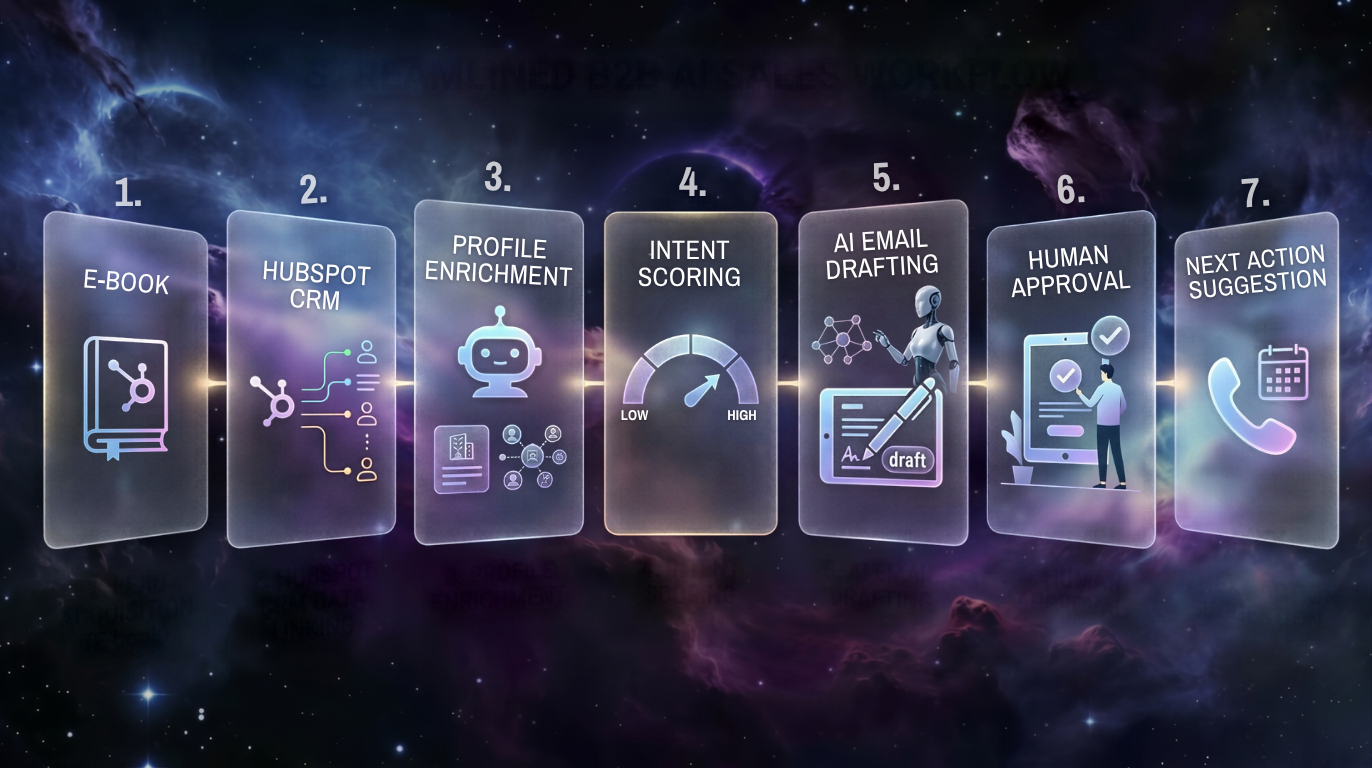
- A contact from a target company downloads an e-book from your website.
- HubSpot records the activity and links it to the company’s record.
- Breeze Intelligence checks the available data and enriches the company’s profile (e.g., adding that it’s an e-commerce company with 50+ employees).
- Buyer Intent evaluates repeated visits to the price list and flags the company as a high-intent lead.
- Prospecting Agent evaluates the context, identifies the key decision-maker (if missing from the CRM), and drafts a highly personalized email.
- The sales representative reviews the draft in the CRM, makes any necessary adjustments, and sends the message.
- Breeze Assistant then suggests creating a task for a follow-up phone call.
Breeze in Practice: AI Implementation at Slevomat.cz
As a certified HubSpot Diamond Partner, we have real-world experience deploying these innovations. We recently integrated Breeze AI modules into the processes at our client, Slevomat.cz. The primary goal was to streamline customer support and the creation of extensive internal documentation.
How Slevomat.cz Specifically Uses Breeze AI:
- Smarter Support (Customer Agent): We deployed Breeze AI as an advanced chatbot directly within the HubSpot environment. The agent was trained on Slevomat’s standardized internal processes and manuals. This made it the primary “source of truth” for resolving both customer and internal inquiries, which significantly reduced the workload on senior support specialists.
- Processing Extensive Documentation: We tested the AI’s ability to analyze long Q&A documents and user manuals. We configured the system instructions so that the AI could clearly distinguish document priorities and avoid mixing up information when a query spanned multiple areas.
- Automatic generation of manuals for data anomalies: Slevomat faced a complex challenge in the form of data anomalies involving company contacts and executives, which were not displayed correctly in the systems. We used Breeze AI to generate clear steps for remediation—we created a precise User Guide Manual for end users and a technical Developer Guide for developers.
This implementation clearly demonstrated that when Breeze is provided with unified and cleaned-up process documentation, it can immediately generate tangible value.
What Breeze Replaces, What It Doesn’t, and the Security Considerations
Today, B2B companies often support a complex ecosystem of applications—sales uses ZoomInfo, marketing uses Jasper for copywriting, and the company pays for licenses for external AI tools across the board.
Breeze can cover or simplify a significant portion of these tasks, but it is not an automatic replacement for all specialized tools. When comparing solutions, it’s always necessary to evaluate the specific features, integrations, and limitations of both.
The advantage is the overall simplification of the technology stack and a reduction in context switching (constantly switching between windows). Another benefit for the company is that the AI operates directly within HubSpot’s controlled environment, respecting the configured user permissions.
However, this environment does not replace the need for properly configured internal security policies and control over which data the AI is permitted to access.
HubSpot Credits, Pricing Plans, and Feature Availability
The availability of Breeze features isn’t determined solely by whether you have HubSpot. It depends on the specific module (Hub), plan (Starter, Professional, Enterprise), and user permissions. The Agent Hub module is available starting with the Starter plan, but using specific features is subject to the credit system.
How do HubSpot Credits work?
Many AI features (such as the standard Assistant) are included in your plan. However, advanced operations—typically running autonomous agents, Data Enrichment, or Buyer Intent—may consume what are known as HubSpot Credits. Therefore, it’s essential to monitor not only the fixed license cost but also the volume of usage for these credit-based services in your account.
System Limits and Prerequisites for Success
Despite its undeniable advantages, integrated AI is not a magic wand that will fix poorly configured processes. Successful implementation rests on two pillars:
- The “garbage in, garbage out” rule: AI cannot compensate for disorganization in the CRM. If sales reps fail to update case statuses or the database contains duplicates, Breeze’s outputs will naturally be misleading. A thorough data audit is a prerequisite for deployment.
- The “human-in-the-loop” approach: Delegating the sending of emails to clients or the publication of content to an algorithm without any oversight poses an unnecessary reputational risk. Especially during the first few months of integration, a model is necessary in which a human always reviews and ultimately approves important AI outputs.
How to Properly Measure Return on Investment
To justify the deployment of Breeze, don’t evaluate it based solely on gut feelings. Focus on measurable metrics across departments:
- Sales: Reduce the time needed to prepare for a meeting (e.g., from 20 minutes to 5 minutes thanks to AI summaries). Track the time from lead acquisition to the first meaningful response and measure the reply rate for emails generated by the Prospecting Agent.
- Marketing: Track the number of hours saved when creating initial content drafts and the volume of automatically enriched data in the CRM that the department previously had to look up manually.
- Customer Support: Measure the number of inquiries resolved without human intervention and track the average cost per resolved service case (Cost per Ticket).
The Future of Working with Data and CRM
Artificial intelligence is gradually ceasing to be an isolated browser window that requires specific knowledge of how to prompt it. It is becoming an invisible infrastructure layer that accelerates work in the background. For organizations that actively use HubSpot and keep their data up to date, Breeze offers a tangible advantage. It shortens meeting prep time, recommends more precise actions, and makes customer support work easier.
Are you considering implementing Breeze AI in your company? As our experience with Slevomat.cz has shown, artificial intelligence delivers results only when it’s properly integrated with business processes. As a certified HubSpot Diamond Partner, we’ve completed dozens of successful integrations and know how to set up your data so that AI works for you—not against you.
We’ll help you with an initial data audit, process optimization, Breeze AI implementation, and detailed training for your entire team. This way, you’ll get the most out of your CRM from day one and keep your HubSpot Credits costs under control.
Book a free, no-obligation consultationat , and let’s work together to find out how much time and money this new AI can save your business.




.png)