


Until a few years ago, if a company wanted to "automate" something, they had to call a developer. This meant specifying, programming, testing, deploying to a server - and often higher costs than automation alone could save. For the average user, automation was something overly complex and technical.
Today, however, the situation is different.
Modern tools make it possible to create automations visually - by clicking and linking steps. Without having to write complex code, you can link a form to your CRM, automatically send notifications to Slack, generate reports, or even engage AI to answer emails for you.
One tool that enables this change is n8n.
If you're wondering how to save yourself hours of routine work while still having control over your data and costs, n8n should definitely not escape your attention.
What Is n8n?
n8n is an integration platform for workflow automation - it connects applications and data into controlled flows that can be both deterministic and AI-driven.
Instead of manually transcribing form data into CRM, sending notifications to colleagues, or copying information between systems, you can link these steps into an automated scenario. When an event occurs (for example, a new lead comes in), a predefined sequence of actions is triggered.
What makes n8n interesting is its flexible architecture:
- Visual environment (drag-and-drop builder) - you compose the workflow from nodes on the canvas, you can see the data flow and you can easily debug it step by step.
- AI-native workflow - n8n is one of the tools that are the furthest along in practical AI integration today (LLM, agents, working with context and tools), so it's also suitable for automations where the model does part of the "decision making".
- Control over the environment and data (self-hosted) - you can also run n8n on your own server, so you have full control over where the workflow runs, where the data flows, and how security or compliance is handled.
This makes n8n not just a "click tool" but a platform that can grow with your needs.
Why is Here So Much Talk About n8n?
Simply put: many companies start with simple automation tools (like Zapier or Make). These are ideal for first-time scenarios, but once:
- you need more complex conditions,
- you're working with larger volumes of data,
- you want control over where the data is stored,
- or you're dealing with AI workflows and API integrations,
then you run into limits.
Well, this is where n8n excels.
It's kind of a bridge between a no-code platform and traditional development. It allows you to start simple, but at the same time it doesn't block the way to more advanced solutions.
How Does n8n Work?
n8n works as an integration layer: you connect different applications and services in it into coherent workflows that are triggered automatically (by events, by time) and transfer data between steps.
Instead of manually switching between tools and copying information, the workflow does the work for you - from data acquisition, to data editing, to final action.
The Basics: Workflow + Nodes
Every workflow is made up of nodes. A node is a "building block" that either triggers something, processes something, or performs an action. You can think of a workflow as a visual map, where you can see the flow of data from start to finish and you can debug and execute each step independently.
Typically, the following types of nodes are combined in a workflow:
- Trigger - new email, webhook from a form, change in a table, schedule (cron).
- Integration / action nodes - creating a record in CRM, sending an email, a message to Slack, writing to the database.
- Transforming and working with data - mapping fields, filtering, merging, formatting text, working with JSON.
- Logic - IF conditions, branching, loops, "fallback" branches on error.
- HTTP request - universal node for calling any API when there is no ready integration.
- AI nodes - classification, information extraction, summarization, text generation, but also agent behavior.
Integration Without Writing API: Ready Modules + Authorization
A large part of integrations work without having to solve the API manually. For many services, this is enough:
- Select a ready-made node (e.g. Google Sheets, Gmail, Slack),
- log in via Google/Microsoft etc. and authorize access,
- fill in what the node should do (e.g. "create new row", "send email", "find record").
The API call (HTTP request) is mainly used when:
- integration does not exist,
- you need a special endpoint,
- or you want to do something beyond the predefined actions.
Where AI and "Agents" Fit in
With traditional automation, the flow is often deterministic ("if X, do Y"). With AI workflow, the principle is a bit different: you don't just define fixed steps, but often give AI context and tools it can use.
Typically, it looks like this:
- n8n provides reliable integration with systems (data retrieval, writing, notification, logging),
- AI node decides "what to do" (e.g. query classification, response design, information extraction),
- and subsequent workflow steps take specific actions (ticket, email, task, CRM update).
This is where n8n excels: it can combine the world of integrations (reliable steps) with the world of AI (working with context and decision making) into one coherent process.
Examples From Practice: 3 Simple Scenarios Where n8n Saves Time
To make sure we don't just stick to theory, let's show three concrete examples where n8n can be used.
1) Q&A Chatbot Over Custom Data (RAG)
Situation: you have a corporate knowledge base (PDF manuals, internal guidelines, Confluence/Google Docs) and you want AI to answer from it consistently and according to your rules.
S n8n:
- Workflow retrieves documents from selected sources and continuously updates them.
- It breaks the text into smaller chunks and stores them in a vector database.
- When a query comes in (from the web, chat, or internally), the AI first pulls relevant context from your documents before responding.
- The answer is sent back to the chosen channel (chat/helpdesk/email).
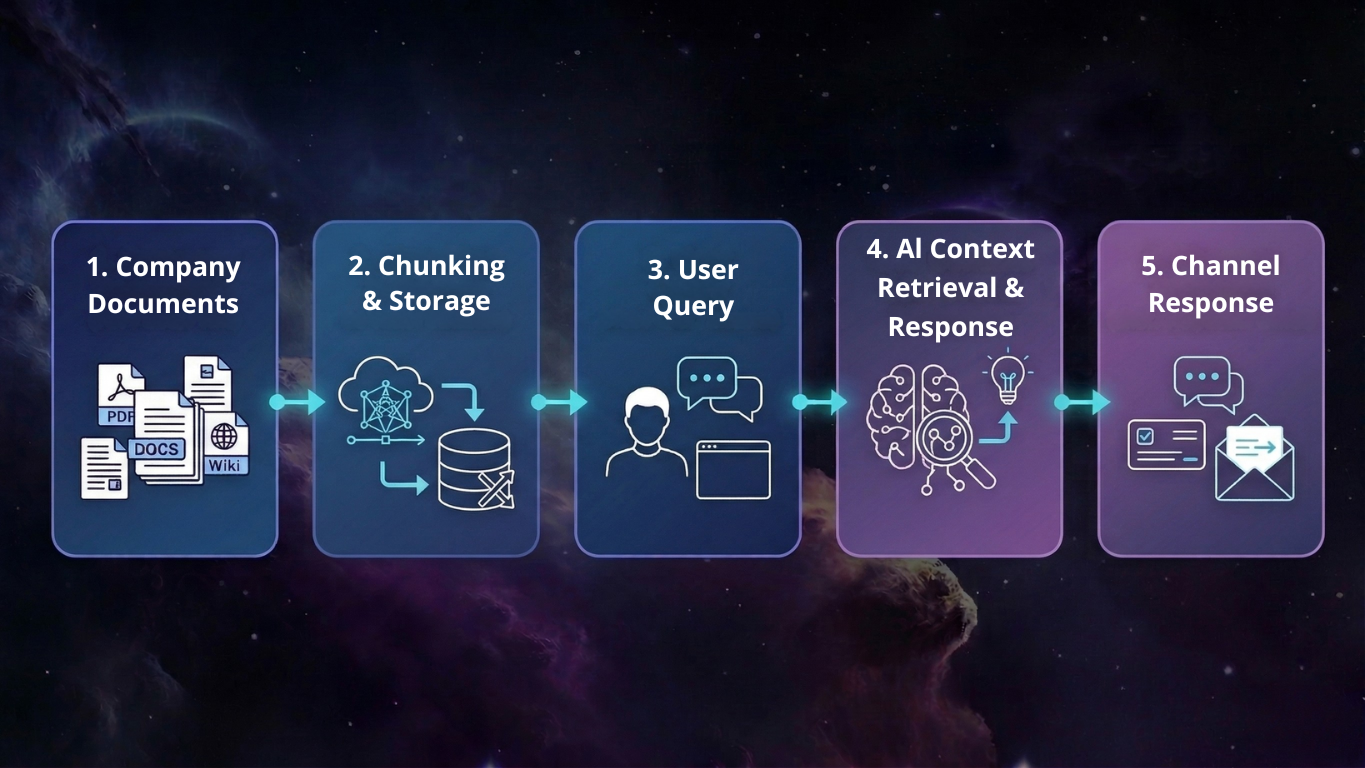
Result: The AI does not answer "in general", but relies on your internal materials. Less hallucinations, more consistent answers and easier knowledge maintenance.
2) Market and Competitor Researcher (Research Agent)
Situation: you need to regularly find out the current prices/parameters of your competitors (e.g. packages, limits, menu changes), but you don't want to do it manually.
With n8n:
- The workflow is run manually or maybe 1x a week.
- It searches for relevant sites (or works with a predefined list of URLs).
- It pulls specific sections from the sites (e.g. pricing tables) and passes them to the AI for structuring.
- AI compiles the output into a report (e.g. table + short summary) and saves it to Google Sheets / sends it to Slack.
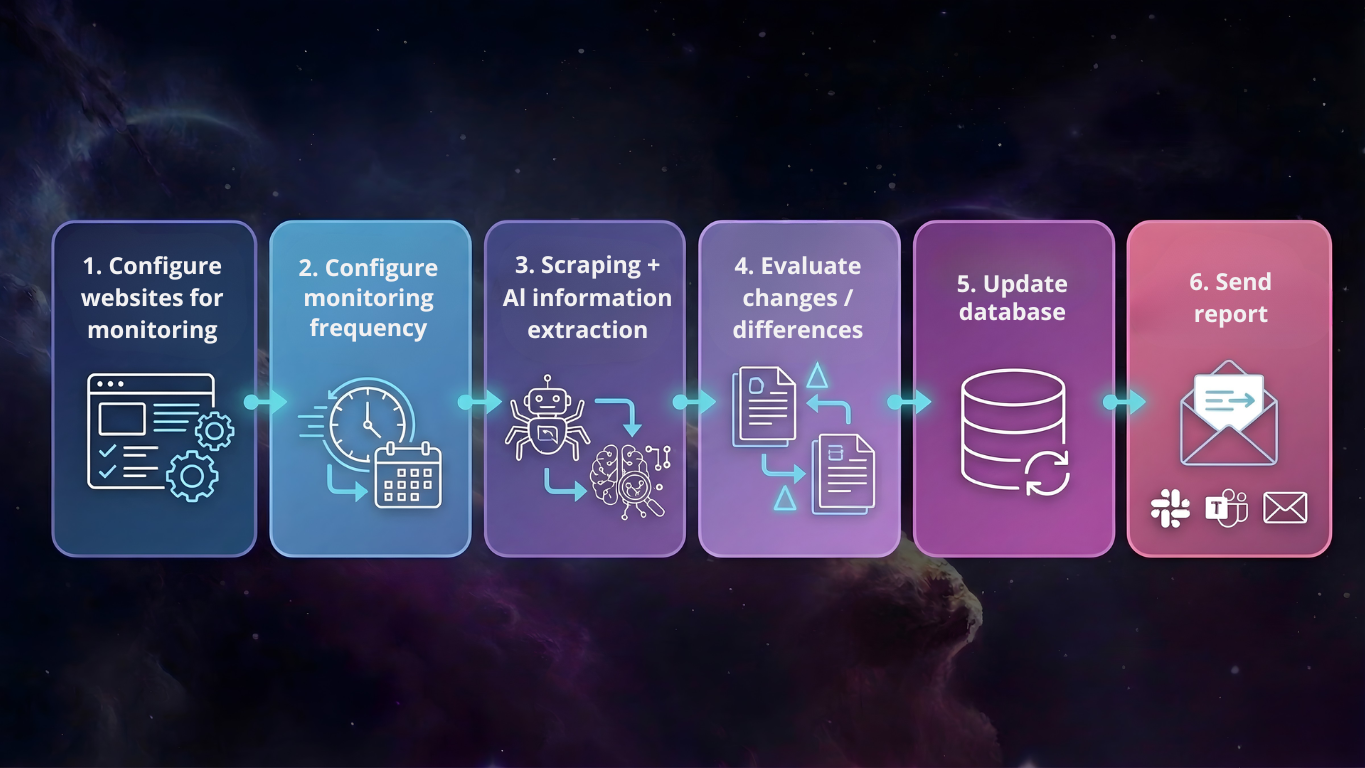
Result: instead of "googling" you have a repeatable process that continuously gives the current market comparison in the same structure.
3) Automatic Extraction of Data From Invoices and Documents
Situation: invoices, contracts or purchase orders are emailed to the company in PDF format. Someone on the team manually transcribes the amounts, due dates, or identifying information into the accounting system or spreadsheet.
S n8n:
- The workflow starts when an email with an attachment is received.
- The PDF is downloaded and forwarded to the AI for processing.
- AI pulls key fields (amount, currency, ID, due date, invoice number) from the document.
- The data is automatically entered into the accounting system / Google Sheets / ERP.
- In case of any ambiguity (e.g. missing data), a notification is sent for checking.
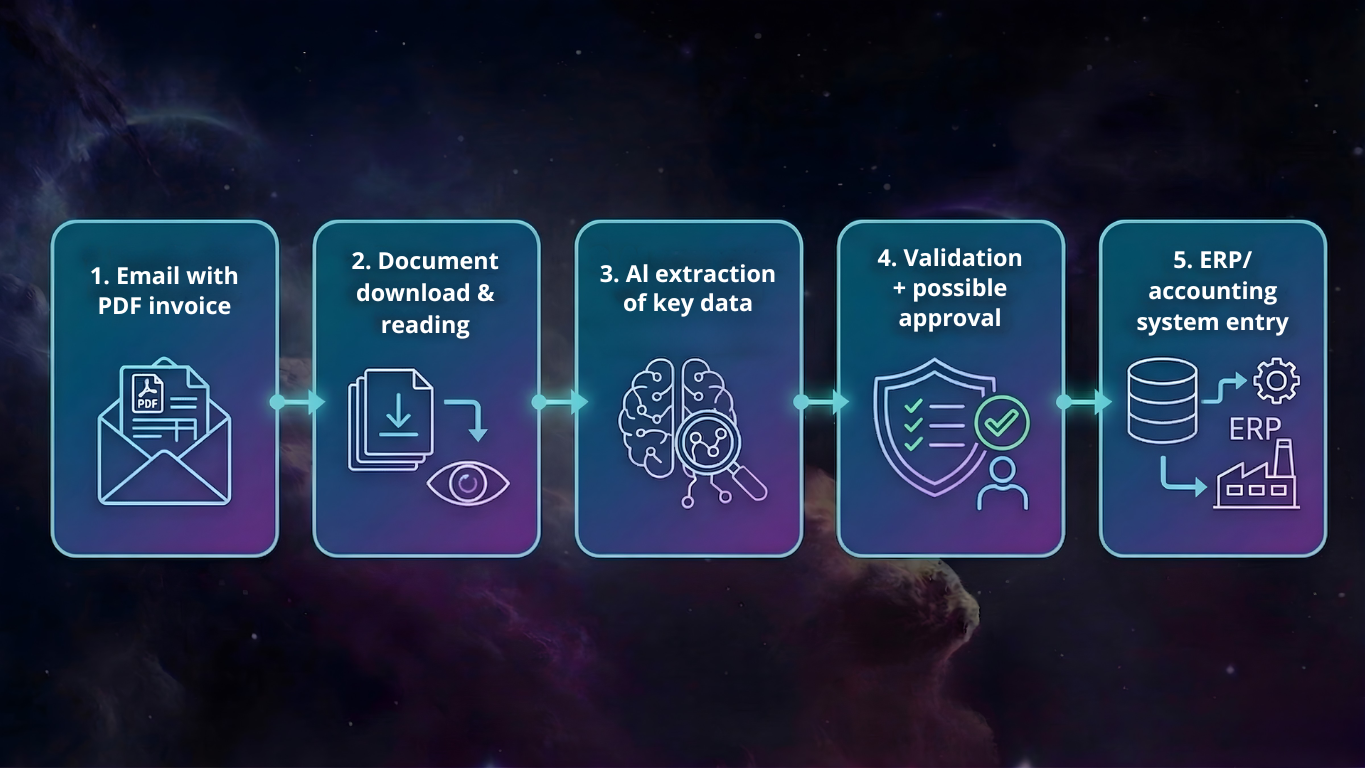
Result: instead of manual transcription, you have structured data in seconds. Fewer errors, faster processing and a full audit trail.
How Much Does n8n Cost?
One of the big advantages of n8n is the flexibility even in the pricing model. You can choose between self-hosting and an official cloud solution.
1) Self-host - Free Software, but You Have to Arrange the Hosting Yourself
The n8n Community Edition can be downloaded and used for free because it is open-source/fair-code. But that doesn't mean completely free - you have to host it somewhere and that costs something.
If you run n8n on your own server (e.g. VPS):
- cheap VPS with common providers costs about 5-15 € per month
- If you want higher performance / SLA / backups etc, the price can be even 30-100 €+ per month depending on configuration and provider.
Summary: the software is free, but you have to pay for the infrastructure.
2) n8n Cloud - Official Managed Solution
If you don't want to deal with infrastructure, you can use n8n Cloud.
The n8n Cloud plans start at approximately:
- Starter: approx. 20 USD per month
- Pro: approx. 50 USD per month
- Enterprise: individual pricing according to the needs of the company
Cloud includes hosting, updates and basic support.
However, you need to take into account that the cloud has limits on the number of workflows you can run, which can increase costs for larger volumes of automation.
Which Option To Choose?
- Want a quick start without the technical hassle? → Cloud from $20 per month.
- Do you need control over your data (security, compliance) or are you scaling at a larger scale? → Self-host tends to be a better choice in terms of security and cost.
Comparison With Competitors: n8n vs. Make / Zapier
Make and Zapier are great tools for quick and easy automation in a pure cloud environment, on the other hand, n8n is better suited when you need more control, more complex logic, AI workflows or self-hosting.
We've created a detailed comparison on this topic, which you can find in our separate article here: Integration Platform Comparison - Make vs Zapier vs n8n
Conclusion: Automation as a Real Competitive Advantage
Competitiveness today is often based on details: who responds faster, who has their data in order, who can run processes without manual work. When automation works, the team doesn't have to deal with copying between tools, task-watching, or manual reporting - and can focus on performance.
But for this to really work, n8n needs to be designed correctly: where the trigger should be, what is the source of truth for the data, how errors are handled, who approves what, what are the execution limits, etc.
We have specialists for all this. At FORECOM we can:
- Design automation architecture and specific use-cases,
- build n8n workflows (including AI),
- set up self-host / cloud, security and monitoring,
- and fine-tune everything to be sustainable and functional in the long term.
Want to quickly see where n8n would bring you the most benefit? Contact us for a free initial consultation, during which we'll walk through your processes and suggest specific automation opportunities.


-1.png?width=479&height=268&name=Untitled%20design%20(9)-1.png)

.jpg?width=490&height=245&name=Advanced%20prompt%20engineering%20thumbnail%20(1).jpg)