


Sooner or later, most growing companies reach a point where their existing business software no longer meets their capacity and functional needs. The system that was initially chosen to consolidate data and streamline work gradually becomes an obstacle. Users have to work around its limitations, parallel records are created in spreadsheets, and some key tasks end up back in email inboxes.
The reason is quite simple. Off-the-shelf solutions (SaaS) are, by their very nature, developed to suit the broadest possible range of clients. However, as your business processes become more specialized and your business model more complex, you’ll find that you have to start adapting to the software, rather than the software adapting to you.
Today, however, the enterprise software market is undergoing a fundamental shift. Thanks to the emergence of advanced low-code and no-code platforms combined with artificial intelligence, developing your own CRM has become a much more accessible and flexible alternative. Custom-built systems have shifted from being the exclusive domain of giant corporations to becoming a viable option for small and medium-sized businesses. But what does the term “custom system” actually mean these days, and what options are currently available to companies?
Three Levels of Enterprise CRM Systems
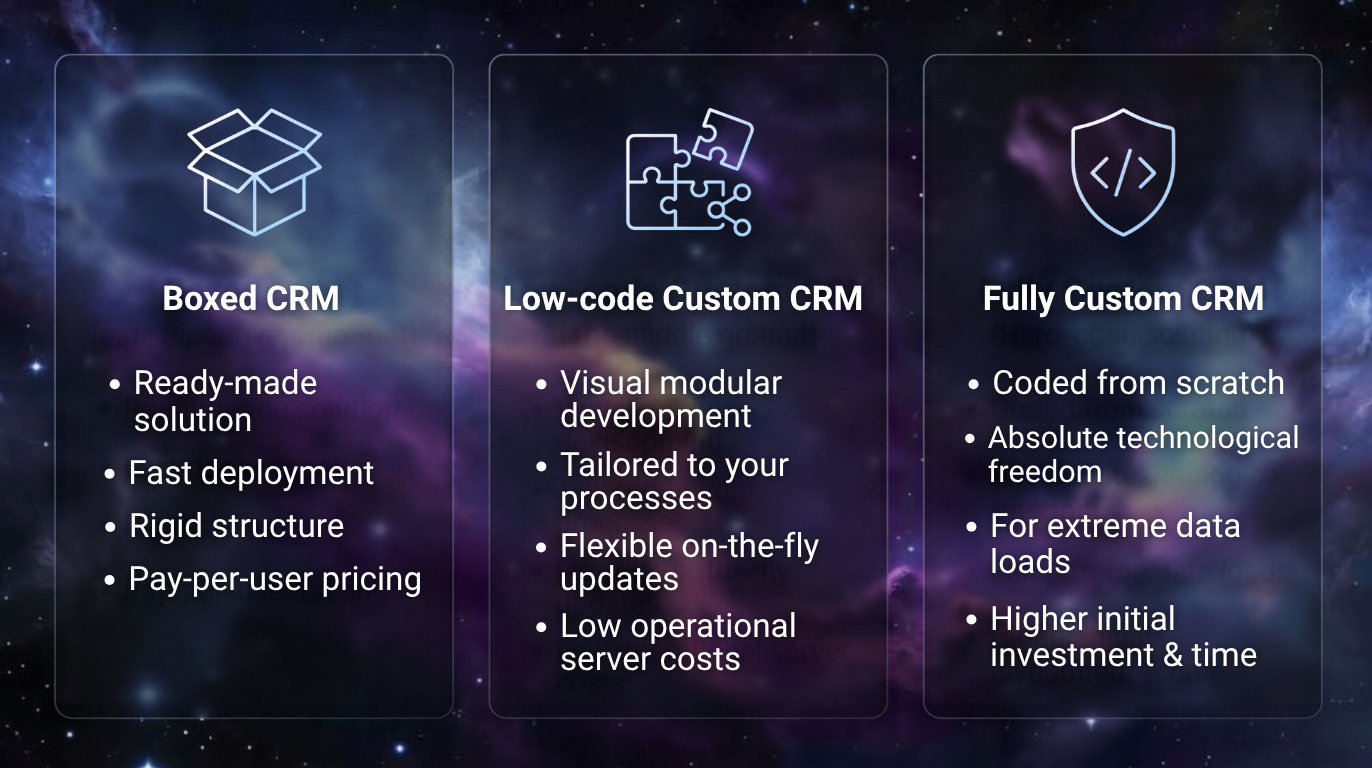
Today, the term “custom CRM” no longer automatically means hiring a team of developers to write the entire code from scratch. The enterprise software market has diversified and currently offers three completely different technological approaches. Understanding the differences between them is key to making the right decision.
 1. Configurable SaaS CRM (Off-the-shelf solutions)
Typical examples include established platforms such as HubSpot, Pipedrive, and Salesforce. These are ready-made, closed products. The system is already fully programmed, and users can customize it visually and functionally to a certain extent. Typically, this involves adding custom data fields, modifying sales pipelines, and setting up basic automation rules. However, the internal architecture and data model are strictly defined by the provider and cannot be deviated from. This approach is ideal for companies with standard, straightforward business processes.
2. No-code and Low-code Custom CRM
This is currently the fastest-growing category, which has made custom development accessible to a broader market. The system is not built by writing traditional programming code but is created on top of a custom-designed database using visual blocks on platforms such as Make, Bubble, Retool, or Softr. In this case, the development team does not have to worry about the underlying infrastructure, server hosting, or security protocols, as these elements are handled by the platform itself.
This allows the team to focus exclusively on modeling the specific logic of your business. Artificial intelligence also plays a crucial role today, helping to generate more complex data relationships and writing specific scripts where the platform’s visual interface is insufficient. As a result, the development cycle is drastically shortened.
3. Fully Custom CRM (Hard-coded Solution)
This involves classic development from the ground up using traditional programming languages. In this case, the company owns the complete source code, uses dedicated servers, and employs proprietary database solutions. This approach provides absolute technological freedom but requires significant investment in both initial development and subsequent maintenance. In practice, it is primarily chosen for robust applications that process extreme volumes of data, require specific hardware integrations, or are subject to the most stringent security checks.
How a custom build works
The difference between an off-the-shelf solution and a custom build (especially one built on low-code platforms) is best seen in the architecture itself. The build takes place across three interconnected layers.
The Data Model as a Mirror of Reality
With off-the-shelf CRM systems, you have predefined objects at your disposal—usually Company, Contact, and Opportunity. A custom build begins by defining the database precisely according to your industry. If you run an agency, your core objects will be Budget, Rate, Campaign, and Allocation. The software doesn’t try to force your business into a one-size-fits-all template; instead, from day one, it structures the data the way you actually work with it.
Process Logic and Automation
While SaaS systems excel at linear sales (lead → meeting → proposal → signature), a custom build allows you to handle more complex cycles. As soon as a sales rep closes a deal, the system can automatically create a project folder, generate tasks for the implementation team, and send data to accounting software to issue a pro forma invoice.
Separate User Interfaces
In a custom-built system, different applications for different users can be built on top of a single central database. A sales representative on the phone only needs a simple list of meetings and a button to quickly add a note. A back-office employee, on the other hand, will appreciate a complex spreadsheet on their monitor with dozens of filters and the ability to approve documents.
Ecosystem and Integration
A modern custom CRM does not function as an isolated unit. One of the main reasons companies are switching to in-house development is the need to communicate seamlessly with the surrounding software ecosystem. With off-the-shelf solutions, integration with local accounting systems or specific business applications is often limited or requires the purchase of expensive add-on modules.
A custom system, on the other hand, is designed as a central hub. Through API interfaces, it can automatically transfer information to other tools in real time:
- Accounting and Invoicing: Once the final calculation is approved, the system automatically sends the documents to the accounting software (e.g., Pohoda, ABRA), and as soon as the invoice is paid, the order status in the CRM is automatically updated.
- Communication channels: Direct integration with email servers or telephone switchboards ensures that the complete history of conversations with a client is immediately visible on their detailed profile, without anyone having to manually transcribe anything.
- Website and client portals: Inquiries submitted via web forms are not only automatically imported into the system but can also be directly assigned to specific sales representatives based on their capacity or the region they manage.
Minimum Viable Product Strategy
A common concern when considering in-house software is the idea of a year-long development process that results in a complex product employees don’t want to work with. That’s why a completely different approach is taken today.
The key concept is working with what’s known as an MVP (Minimum Viable Product). Instead of immediately building a robust system designed to theoretically cover 100 percent of the company’s operations, the process itself is divided into three logical phases:
- Analysis and Reduction: A single critical process is identified that is currently slowing the company down the most (for example, inconsistent recording of business transactions). Other supplementary functions are deliberately set aside in the first phase.
- Rapid Core Deployment: This streamlined yet fully functional core is built on the platform and deployed into production, typically within a few weeks.
- Ongoing Iteration: The team begins using the system immediately in a real-world setting. Based on immediate feedback from actual use, features are fine-tuned, and additional modules (such as reports or inventory management) are gradually added to the system.
A custom CRM is therefore never a definitively “finished” project. It functions as a tool that continuously evolves and adapts as the company grows.
Key Benefits and Objective Risks
The transition from an off-the-shelf solution to a custom system brings significant benefits to business operations, but it also requires much greater internal discipline.
Key advantages:
- No licensing limits: With SaaS solutions, you pay a monthly fee per user. A custom-built system operates with fixed development and maintenance costs, and the cost of running the database for 10 or 50 people is roughly the same. This means that software costs do not spike as the company grows.
- Ownership of thelogic: You aren’t dependent on which features the software provider decides to limit, remove, or charge for in the next update.
- Room for Native AI: You can easily integrate language model interfaces into your own system, which can then analyze extensive PDF contracts directly within the CRM, summarize lengthy email correspondence, or even suggest next steps to representatives for a specific order.
Hidden Risks and Disadvantages:
- Risk of technical issues: If the data model is designed incorrectly from the start, the system will begin to slow down as data volume increases, and further modifications will be extremely difficult. A high-quality initial architecture design is absolutely essential.
- The Need for an Internal Owner: A custom CRM isn’t developed by the vendor alone. It requires someone within your company who understands internal operations in detail, gathers requirements from colleagues, communicates with developers, and sets priorities for further modifications. Without this person, the system will soon begin to stagnate.
- Digitizing Chaos: A custom system won’t solve missing or chaotic business processes. If management doesn’t know exactly how orders are generated within the company and who is responsible for what, a custom build will simply replicate that chaos in digital form.
When Is the Right Time for a Change?
A custom-built system is an exceptionally powerful tool, but it’s not a one-size-fits-all solution for every company. Implementing one makes both technological and economic sense when your business model is transitioning from simple sales to more complex fulfillment, and you need to keep the entire order lifecycle under control in one place. It’s also well-suited for companies with non-standard sales channels that can’t be simulated within the traditional sales funnel of standard applications.
Conversely, if your business relies on fast, straightforward sales, your business processes change dynamically, and you lack the capacity to actively participate in managing development, established SaaS CRMs remain the most reliable and secure choice. Therefore, the decision should not be based primarily on technological trends, but on a rational analysis of the areas where your existing software’s limitations are actually holding you back.
Is your company hitting a technological ceiling with its current software, and are your processes held together only by separate spreadsheets?
As part of our implementation services, we specialize in analyzing business processes and building CRM systems that accurately reflect the reality of your business. We’ll help you objectively assess whether a custom build is the right path for your company, and we’ll design an architecture that fully adapts to you—not the other way around.
Schedule a no-obligation consultation, and let’s streamline your processes



.jpg?width=490&height=245&name=Kopie%20n%C3%A1vrhu%20HubSpot%20Pricing%20(1).jpg)
.png?width=399&height=225&name=MarTech%20Stack%20(1).png)