Often, when discussing with clients, we get the same question, " Why should we invest hundreds of thousands in an Enterprise solution from HubSpot when we can build WordPress for essentially free?"
It's a perfectly legitimate question. There are countless free or low-cost platforms on the market today. But the truth is that if your website is growing and becoming the main sales channel of your business, sooner or later you will hit the limits of the conventional systems. The purpose of this article is not to argue that cheap CMSs are bad. But let's take a rational look at where the standard ends and what exactly you're paying extra for with HubSpot Content Hub Enterprise.
What is (and should be) commonplace today
Before we look at the premium features, let's be clear on the baseline. The following features are what any decent CMS should be able to do today (and you'll find them in the cheaper versions of HubSpot, of course):
- Visual Editor (Drag-and-Drop): you can build the landing page yourself without having to ask the developer to change the code.
- Basic SEO and responsiveness: editing meta descriptions, headings and making sure the site works on mobile.
- Basic security: deploy SSL certificates and standard spam protection.
In terms of today's B2B and B2C segment requirements, this is more of a necessary standard. The real shift comes when you stop seeing the website as a static business card and start expecting it to actively work with customer data.
What is the real value of the Enterprise version?
When we look under the hood of HubSpot Content Hub Enterprise, we don't just find prettier templates. We'll find tools that solve real operational problems for large companies.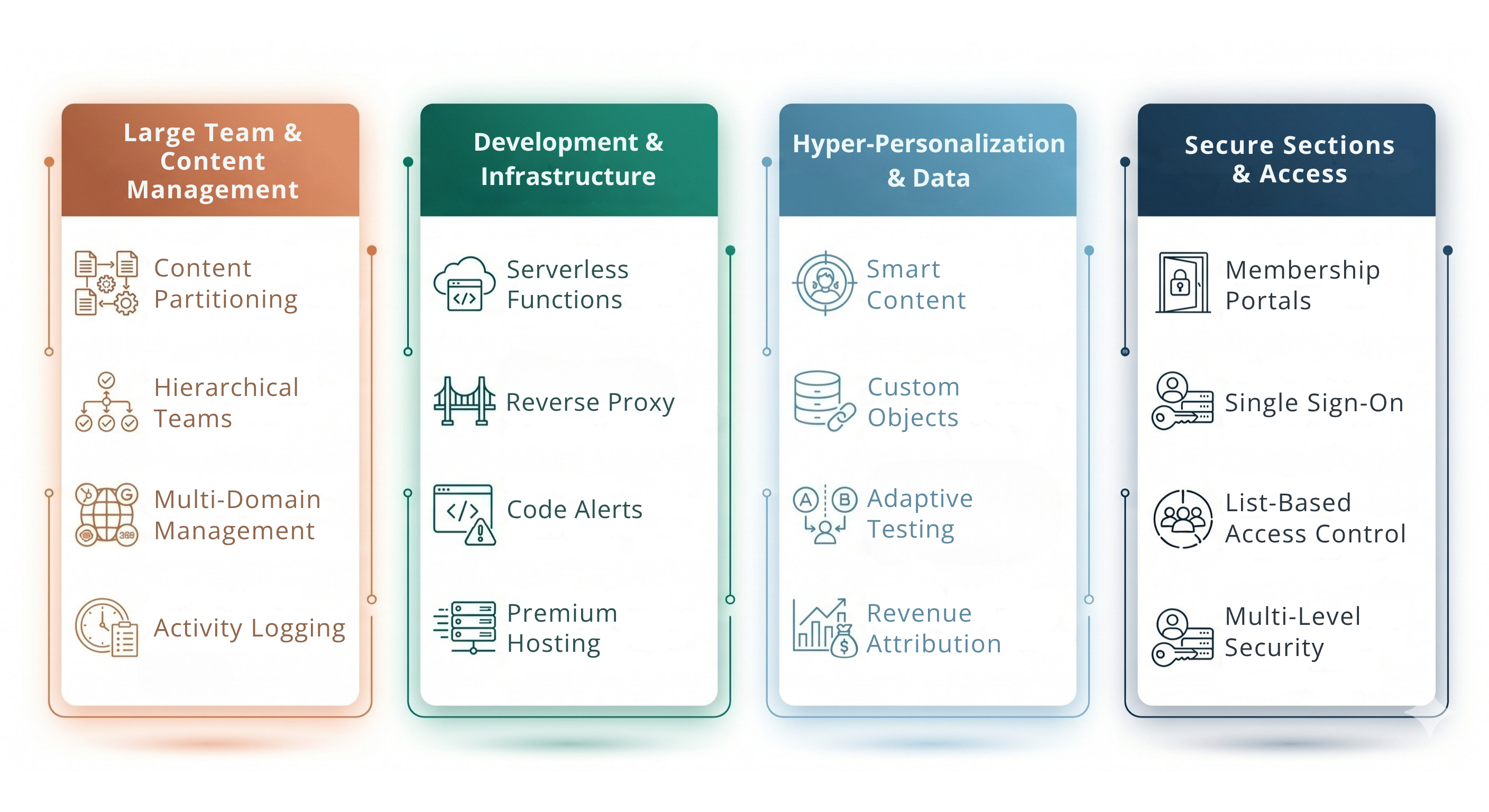
1. Team Order (Content Partitioning and Hierarchical Approaches)
Imagine this situation: you have thirty users working on your website from different departments and three different countries. In a typical CMS, everyone has administrator rights. One click and someone will accidentally overwrite a key campaign or break the structure of a foreign language version.
Enterprise solves this with the Content Partitioningfeature . You simply divide the site into logical units. The HR department only gets rights to the career pages. The French office can only edit their region. You add a hierarchy - content only really goes out when a manager approves it. You can be sure that even with dozens of users you can keep the site tidy.
2. Smart content personalization
Most websites work like a billboard - showing all visitors the same thing. But an IT director has completely different needs than a student looking for a part-time job.
Because HubSpot is a CMS and CRM in one, you can create dynamic content based on real data. Do you know the type of visitor? Show him a relevant case study on your homepage. Is it a client who has already purchased from you? Change the main button from "Request a demo" to "Go to client portal".
3. Serverless Functions
Your developers will especially appreciate this. Want to add an interactive product configurator, a complex credit calculator or connect to an external vendor database to your site?
For a regular website, this means getting another server, setting it up, linking it up, and keeping it regularly updated and secure. HubSpot Enterprise offers Serverless Functions. The developer writes the code directly in HubSpot and it takes care of everything else - from performance to security. You develop faster and take the worry out of infrastructure maintenance.
4. Community creation (Membership features)
More and more companies are moving part of their business behind the imaginary curtain, and with HubSpot, you don't need an external platform to do it. You can easily lock down specific sites, manage user passwords, and track how your clients are engaging with premium content right in your CRM.
5. Premium hosting and analytics
The enterprise version of HubSpot runs on a cutting-edge infrastructure. Plus, by connecting with sales data, you see real analytics. You don't just see "number of visits" anymore. You know exactly which blog article or which specific landing page brought you real closed deals last quarter.
HubSpot Enterprise vs. WordPress
Let's go back to the original question - why not WordPress when it's free?
If you're creating a simple blog, WordPress is a great choice. But if you're building a high-demand enterprise portal, the "free solution" starts to get very expensive. To get WordPress to the Enterprise level, you need to fill it with dozens of plugins. You need one for SEO, one for speed, one for forms, one for security, and one for languages.
Every week you have to update the plugins and hope that two of them don't clash and bring down your entire site. Furthermore, security loopholes in third-party plugins are the most common reason for hacker attacks. As a result, you have to pay an outside agency or an in-house developer just to keep the system running at all.
HubSpot works differently, it's a closed, native ecosystem. You don't need dozens of plugins from unknown developers, it's all in the base. HubSpot takes care of security patches, updates, and infrastructure.
Conclusion: does this make sense for you?
HubSpot Content Hub Enterprise isn't for everyone. If you have a static website that gets a few hundred visitors a month and is managed by one person, it would be a pointless and expensive investment for you.
But if your website is the core of your corporate communications, it's managed by a broader team, you need to precisely target content to different types of customers, and you don't want to spend time constantly fixing technical issues, the situation changes. In this case, you're no longer just looking for an "article editor". You're looking for a stable and secure base that won't hold your business back, but instead will allow it to grow smoothly. And that's exactly the moment when investing in an Enterprise solution starts to pay off very quickly.
Wondering if the Enterprise version makes sense for your website? Switching to a premium CMS is a strategic decision. Don't leave it up to guesswork. We'd be happy to discuss your current technology infrastructure with you, evaluate your business goals, and set the record straight on whether investing in HubSpot Content Hub Enterprise is worth it technologically and financially.


.png?width=458&height=256&name=Untitled%20design%20(36).png)

.png?width=479&height=270&name=Untitled%20design%20(1).png)